
Imagine spending hours crafting the perfect email sequence on Systeme.io, only to realize half of your leads never even open them because they went straight to the spam folder.
The solution comes down to domain security. Learning how to authenticate domain Systeme io Godaddy ensures mailbox providers like Gmail and Yahoo trust your sending identity.
Once you connect your GoDaddy DNS records correctly, your deliverability will soar.
Keep reading, and I’ll share 5 steps to authenticate your domain, and I’ll give you a cheat sheet to help get your emails, opened, read, and clicked on, which can earn you more money.
Systeme.io Tier & Automation Limits
Select a plan tier below to compare contact limits, funnels, and automation capacity.
Step 1: Create Your Free Systeme.io Account to Get Started
Systeme io is such an amazing tool, and you can get started for free.
For starters, it’s free.
You can send as many emails as you want without spending a penny. The catch is you have to put a Systeme io sticker on your landing page, but you can get paid to do it.
The second catch is you can only have 1 automation with the free plan.
But Systeme io does everything I want it to do in a simple, clunky free format. I used to use another free autoresponder, but I prefer Systeme io WAY more, and I share my experience in this post.
Step 2: How to Find Your Systeme.io CNAME and DMARC Verification Records
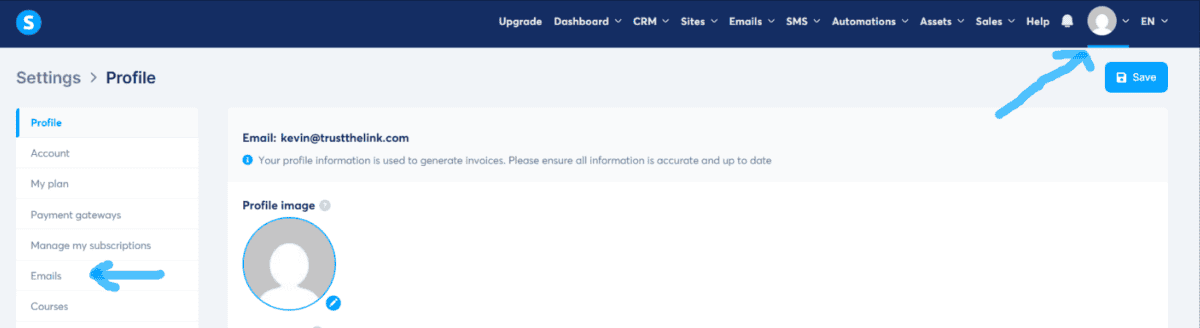
Next, after you log in, you want to click on your profile picture and click on “settings.”
On the left side, there is a large menu, and you want to click on “emails.”
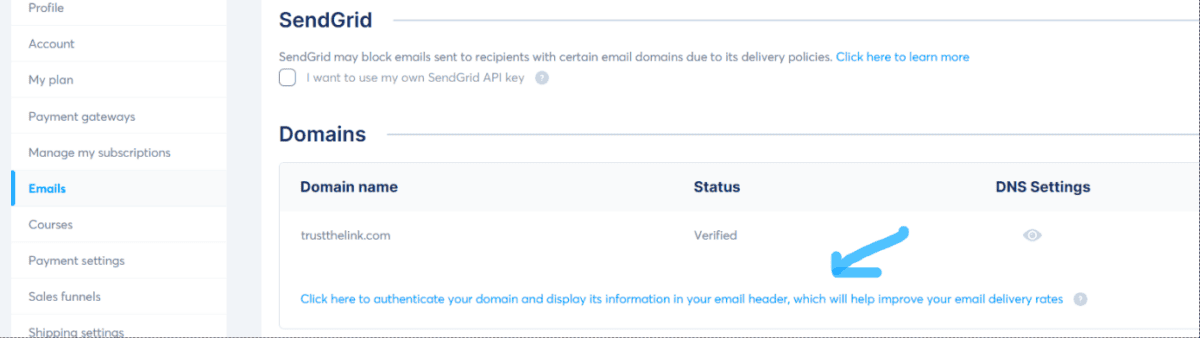
Then scroll down to where it says “click here to authenticate your domain.”
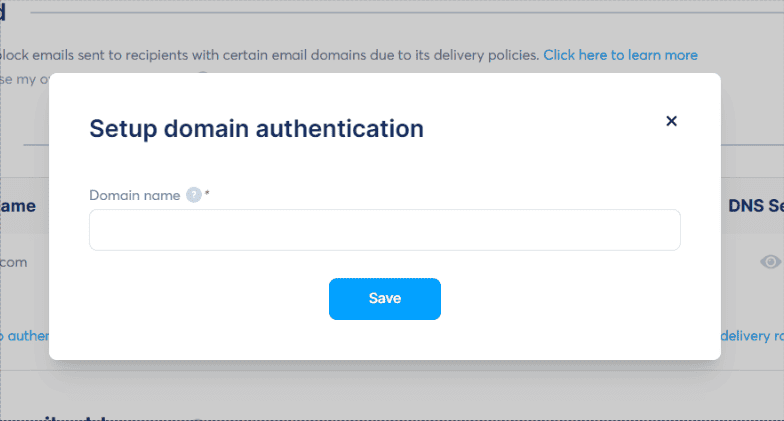
Next, you will enter the domain that you have.
If you don’t have a domain, then it’s a really good idea to purchase one.
Yes, you can use Systeme io without owning a domain, BUT your deliverability will tank, meaning fewer people will see your messages.
Oh, and this place is where you can pick up a domain for 99 cents.
Also, when you have a domain, you own something online, so it’s a great feeling.
Take it from me, someone who has lost a large Reddit group, 2-3 Quora accounts, 1-2 Medium accounts, and even a YouTube channel.
These platforms are always changing rules and evolving. Having a domain feels like security.
Next, Systeme io will give you 3 CNAME records and a TXT record.
Step 3: How to Check Where Your Domain DNS Records Are Hosted
This is the part that can get tricky.
Even though I purchased the domain at GoDaddy, I’m hosting it at DreamHost.
- DreamHost is one of only three hosting providers officially recommended by WordPress.org
- While most hosting companies offer a standard 30-day refund window, DreamHost gives users 97 full days
- DreamHost backs its service with a literal 100% uptime guarantee
When I’ve had issues with my website, DreamHost walked me through getting it back up.
It’s really very inexpensive, and the control panel is super simple.
So wherever you’re hosting your domain, you would go there.
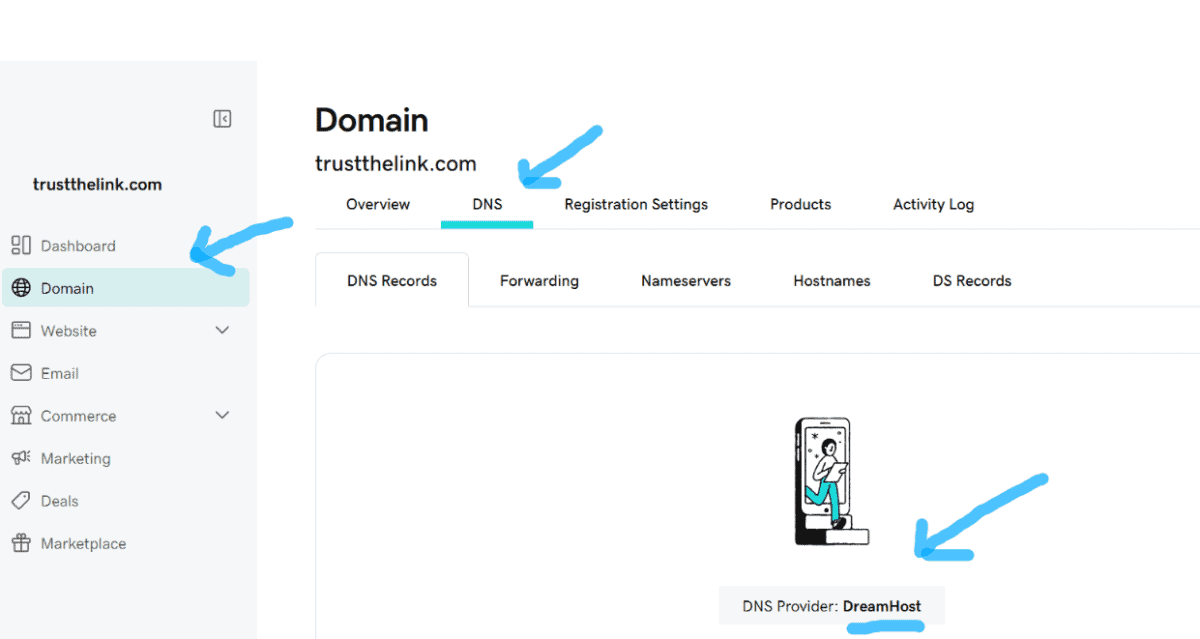
If you’re not sure, a good way to find out is to click on your domain, then click on DNS, and it tells you where your domain is pointing to (the nameservers).
Mine says “DreamHost”; if it says “GoDaddy,” then you would go to GoDaddy.
I found that GoDaddy hosting can be expensive because they know a lot of people don’t want to point the nameservers to another company.
Interestingly enough, there is EVEN free hosting; being the extremely frugal guy I am, I looked into it. I even wrote a post about free hosting and the pros and cons of it.
Step 4: How to Add Systeme.io DNS Records in GoDaddy or Your Web Host
Now you have the data, and have figured out who is hosting your domain; next is to enter the data.
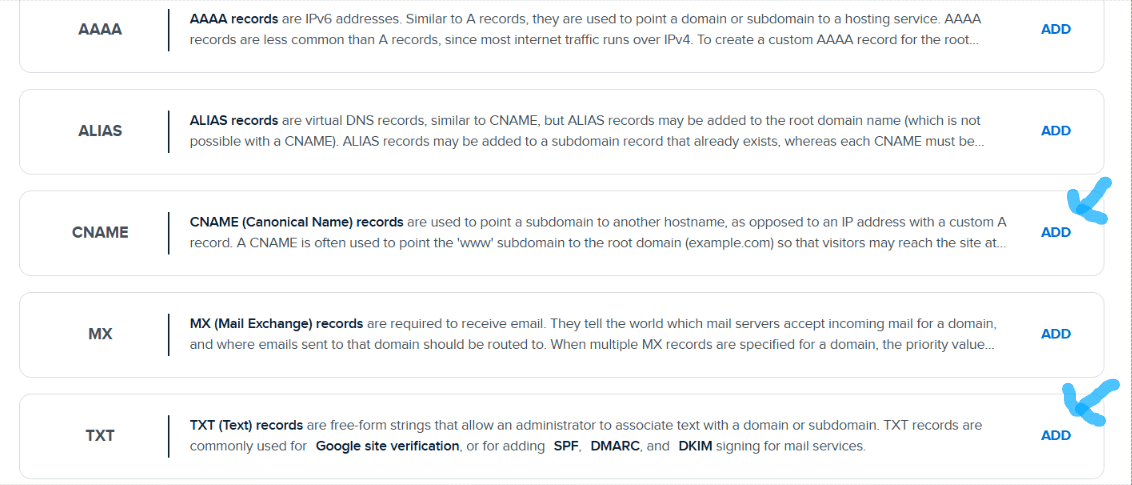
The CNAME records are right below “Alias,” and the DMARC is the same thing as TXT.
Step 5: Common DNS Mistakes When Authenticating Systeme.io Domains
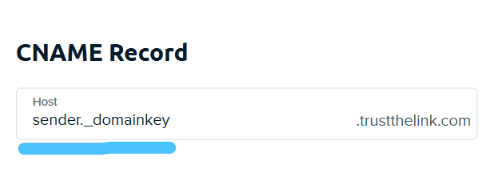
Mistake A: Typing Your Full Domain Name into the Host or Name Field
A big mistake some people make is attaching the root domain to what you type in the host field.
For example, if the host is..systemeio1._domainkey.yourdomain.com
only type systemeio1._domainkey
Mistake B: Creating Duplicate DMARC TXT Records in GoDaddy DNS
If you already have a DMARC (TXT) record for some other service and you try to create a second one, it invalidates both.
Instead, edit your existing DMARC TXT record instead of making a second one.
Mistake C: Omitting the Trailing Dot at the End of CNAME Target Values
I think I might have experienced this before.
Basically, if Systeme Io wants a dot at the end (make sure to put a dot at the end).
Entering inbound.systeme.io instead of inbound.systeme.io.
I remember it wasn’t validating, and then I put a dot at the end and it worked. So if you do everything right and after 48 hours it’s not validating, try this dot trick.
Mistake D: Checking Systeme.io Verification Before DNS Propagation Finishes
It can take 15 minutes to 24-48 hours for the DNS update across global servers.
Meaning some people, after they update the records, expect it to happen in 1 minute.
Usually, it does take some time to update.
Step 6: How to Verify Your Custom Domain Is Active in Systeme.io
Now you did the hard work.
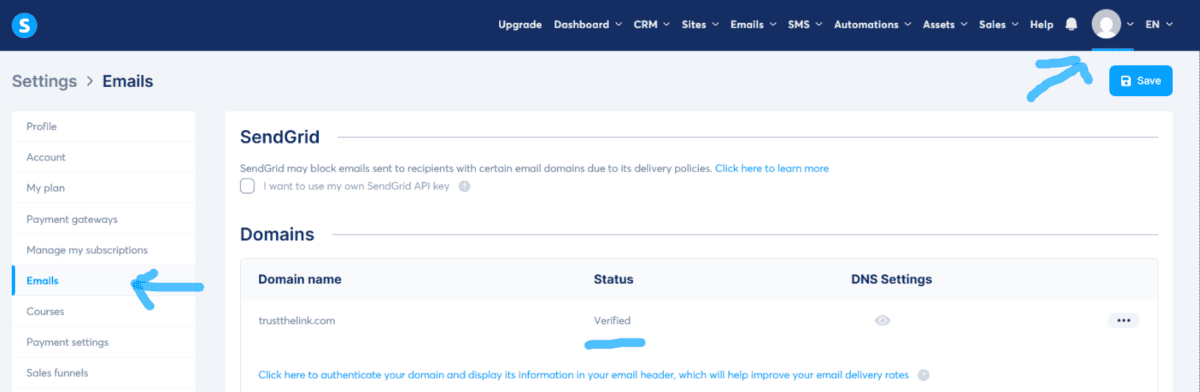
To find out if it worked in Systeme .io, you would click on your profile, then click on “settings,” then “emails” on the left, and there should be a button to check if it’s verified.
If it is, then the status will say “verified.”
Another trick is to wait 15 minutes, go over to this website, enter in your domain, and if there is a green checkmark, then go back to Systeme IO and click on verify.
What I did is I just kept hitting verify every hour, and it worked; I think by the second hour it worked.
Remember, it could take 15 minutes to 48 hours.
Conclusion: Authenticate Domain Systeme io GoDaddy Fast
I hope this post was helpful.
If you want to learn more about how to craft emails, how to get them opened and read, and get more sales, I created a FREE cheat sheet.
I spent 15 years and thousands of dollars to learn this type of copywriting, and I’m giving it away for free.
Have a great day.