
This post was originally published in [2021] and has been fully updated for 2026 with new data and tools.
If you are a digital creator, your choice of platform could be costing you thousands in hidden commissions.
In this SendOwl vs Gumroad fees 2026 comparison, we dive deep into the math that determines your take-home pay.
With Gumroad’s flat 10% fee now standard, many high-volume sellers are looking toward SendOwl’s subscription model to keep more of their revenue. But is the monthly cost worth the switch?
- Gumroad is better if someone is earning less than $500 a month
- SendOwl is better if someone is earning over $1,000 a month
a wonderful shopping cart platform for someone who is new to marketing products and services on
Keep reading, and I’ll share exactly how SendOwl and Gumroad are different, what SendOwl is, 3 ways you can use this tool, where to go to get a TON more ideas, and how 3 other players in this field compare.
2026 Profit Calculator
Enter your monthly revenue to compare platform costs.
SendOwl vs Gumroad in 2026
Both of these platforms are different.
Both allow you to sell nearly anything anywhere.
Gumroad
Has no monthly fees, and you only pay 10% if something sells. You don’t sell anything you don’t pay.
Gumroad also has a discovery platform, so it’s easier to get found and make more sales. Plus, it’s simpler than Sendowl; you can go from file to “for sale” in 5 minutes.
Sendowl
You pay every month, even if you don’t make any sales. This is bad, since as entrepreneurs we are generally more optimistic than the reality.
Trust me, I know. I purchased 800 .com domain names and lost a lot of money being WAY too positive.
The good news is that if you sell a lot of stuff, then Sendowl will be cheaper, at that monthly price.
Plus it has more advanced features like cart abandonment and upsells. The bad news is there is NO marketplace like Gumroad, so you are 100% responsible for your own marketing.
Again, marketing is the HARDEST part, so whatever help you can get in this area is better.
More bad news is that if you leave, you still have to pay the monthly fee to Sendowl.
| Monthly Revenue | Gumroad (10% + ~$0.30/txn) | SendOwl (Tiered Plans) |
| $100 | ~$10.30 | $18 (Starter Plan) |
| $1,000 | $100.30 | $37 (Growth Plan) |
| $5,000 | $500.30 | $89 (Pro Plan) |
| $10,000 | $1,000.30 | $159 (Premium Plan) |
The verdict is that if you’re a beginner earning less than $500 a month, then pick Gumroad. If you earn over $1,000 a month, then Sendowl is the better choice.
How Does SendOwl Work? The Beginner’s Guide to Digital Product Delivery
SendOwl is a website that helps people market ebooks, videos, software, subscriptions, audio files, license fees, or other services online.
You could think of SendOwl as a shopping cart platform! If you had something to sell, such as an eBook, it would make it so you can sell that eBook by giving you a link to a checkout page.
It makes it easier for you to connect your product (whatever that is) to your customer. It handles the marketing, payment stuff, delivery, and more, such as follow-up.
| Sales Volume | Gumroad Fee (10% + $0.50) | SendOwl Starter ($15 – $39/mo) |
| $500/mo | ~$55 | ~$39 |
| $2,000/mo | ~$210 | ~$39 |
| $10,000/mo | ~$1,010 | ~$87+ (Pro tiers) |
SendOwl Review 2026: Is the New Pricing Worth it for Small Creators?
The “largest” thing I like about SendOwl is the UI (user interface), and it’s very easy to use.

The second thing that is great about SendOwl is the marketing tab. They have a lot of features that help you market your product.
They have a way so you can create coupons for your product. There are ways to create time limits on the coupons, amount limits, and how many times they can be used.
The platform also has something known as an upsell. The upsell is just like you think, when someone purchases your product, they are given an opportunity to buy a more expensive product or bundle of products you own.
This is important because when someone is in the buying mood, it’s easier for them to keep buying, right?
You just want to make sure you have “after payment” selected. There is a way to have an upsell before they purchase, and this is called a bump.
SendOwl even has an affiliate program where you can choose all kinds of options, like how long is the cookie duration.
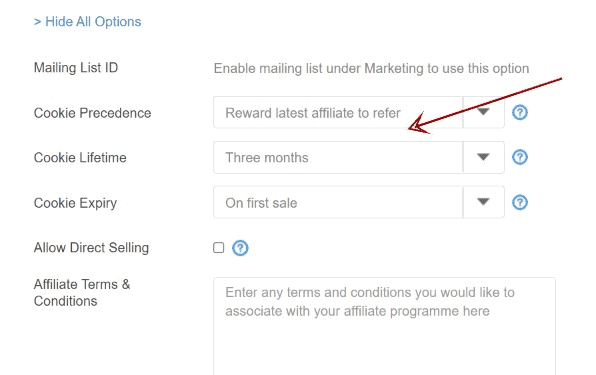
The cookie is a VERY important part of affiliate marketing.
Basically, a cookie is a tracking code that ensures you get credit for a sale in affiliate marketing. If someone clicks on your affiliate link and purchases something after the cookie duration, then you don’t get credit.
Having the ability to create affiliates is REALLY cool.
Another cool feature is the cart abandonment feature. Say someone loads up their shopping cart with your stuff and then doesn’t pay.
Wouldn’t it be cool if you could contact that person?
Then you can send them an email and offer them a 1-time discount if they check out or something. Well, this platform has that feature, and it’s fairly cool.
Also, SendOwl supports “a ton” of different currencies and even Bitcoin through something known as Bitpay.
Let’s talk about some of the areas where SendOwl can improve, or “the cons.”
SendOwl does enable you to bundle a variety of products together and market them, but I have not found a way to bundle products and services together.
Lastly, they do allow you to recruit affiliates, “which is VERY cool,” but some other platforms have more bells and whistles.
For example, I have not found a way to set different commission rates for different affiliates, and other platforms have this ability.
The only other area it could improve on is with webinars, and this is from Vault50’s experience that you can check out HERE.
I’ve not tried SendOwl with webinars because webinar software is VERY expensive. The cheapest webinar software I’ve found is EZTalks at around $22 a month.
Usually, webinars are used to market more expensive products. If you are planning on using SendOwl for webinars, then you might want to look at other shopping cart software such as ThriveCart.
SendOwl Tutorial 2026: How to Sell Your First Digital PDF or Software License
One way you can use this tool is by marketing your own products. Now, this is more advanced than affiliate marketing.
Affiliate marketing is when you market someone else’s products, and you get a percentage of the sale. If you want to learn the easiest way to earn money online, click HERE.
There are MANY products you can create online, but one of the easiest is eBooks. I know what you’re thinking, and that is, eBooks just sound intimidating, right?

Well, there is software that makes creating eBooks “insanely easy.” There really is a TON you can do with Ebooks, from giving them away as link magnets to selling them on Amazon, using them as bonuses, or putting affiliate links in the eBook.
I created a whole blog post on how you can use eBooks and create them by clicking on the link HERE.
What you could do is if you have a website, a YouTube channel, or a social media account (you probably have some), you can use SendOwl to market this type of product.
Oh, and it even works with emails if you have an email list.
Ok, so eBooks are probably the easiest things to create, but what else can you use this tool for?
The ONLY limit on what you can use SendOwl for is with your imagination.
Another idea is with videos. If you create a series of videos walking someone through something, you can actually market that.
Even better is PLR (private label rights). This means you keep 100% of the cash and do no work to create them.
You can sell them, give them away, use them to build a list, use them as bonuses, or use them to grow a social media account. I’m sure there is a lot of you who ask AI.
This PLR HERE I like because they are video courses and you get a TON. Plus, video courses have a lot of perceived value, so you can sell them for more.
This PLR HERE is prompts for AI and covers almost every niche. Since there is lots of value in AI, this is great too.
Or if you can create the video course yourself!
Maybe it’s how to launch a product on Clickbank (I just thought of that), you can walk someone through how to do it, and make money from it.
You could also do coaching calls. Maybe you have a website or blog about “solar panels.” (Everything is going green, right?)
On your blog, you could give away free information about solar panels and then use SendOwl to market your own products, and for an upsell, have a coaching call where you answer their questions directly.
If you want to view how much SendOwl costs, you can click on the link HERE.
The Best SendOwl Alternatives in 2026: Comparison with ThriveCart, Payhip, Gumroad
SendOwl isn’t the only owl on the block and has “a lot” of competition.
One of the largest competitors is ThriveCart. ThriveCart is going to be $495 for lifetime use of the software. ThriveCart also has more options, and this can make things MORE difficult if you’re new to this type of tool.
You can customize the shopping cart to your heart’s content and add 5 different upsells and down sells to the funnel.
The one I REALLY like is this one HERE and has an interesting model.
Instead of charging you a fee, they only charge you a percentage of each sale you make. If you make NO sales, then you don’t get charged.
The bad news is that the charge is 5%, and this can add up quickly. Still, it’s nice to use a FREE tool until you know you can actually make money, right?
Crawl before you walk!
Sendowl does have 2 features that Gumroad doesn’t have, and that is upsell and the abandoned cart feature. Both of these are REALLY nice to have.
Payhip also has a Free version that takes a 5% cut of your money, but they also have monthly plans where they charge less money. One of the cool features that Payhip has is the ability to offer a preview of the product you’re selling. You could think of it like the food samples that Costco offered (that I loved).
These are 4 large players in this field, and there are more, but I like to keep things as simple as I can.
Conclusion to SendOwl vs Gumroad fees 2026 comparison!
What I like about SendOwl is the ease of use and the low cost compared to some of the competition. If you are brand new to marketing your own products online, SendOwl just might be a great place to start.
You can check out the price of this tool by clicking on the link HERE.
Also, the premium plan might be better because you have some nice features like upsells and cart abandonment that, if they are used 1 or 2 times a month, will probably put money in your pocket.
If you have NEVER made any money online, then I recommend learning how to crawl before learning more advanced things, such as creating your own products and marketing them.
An easier way to earn money online is with affiliate marketing. With affiliate marketing, someone has already created the product, handles the billing and customer service, and all you do is provide a link.
You can do it anywhere, anytime, around your schedule, in nearly any niche, plus it’s a very low price to start and can be a lot of fun.
I’ve been doing affiliate marketing for 15 years, and I’ve giving away my system for FREE HERE.
I hope this blog post on whether SendOwl is legit and good to use was helpful. Bye for now.