

This post was originally published in [2021] and has been fully updated for 2026 with new data and tools.
Filing crypto taxes in 2026 has become a high-stakes game thanks to increased IRS scrutiny.
If you are comparing Koinly tax loss harvesting vs CoinTracker 2026 features, the biggest difference might be your wallet.
While CoinTracker has introduced powerful new AI-driven suggestions, many of its best optimization tools are now locked behind a $199/year “Prime” paywall.
Koinly, however, continues to offer a free tax loss harvesting simulator that lets you visualize your savings before spending a dime.
The winner is Koinly! Koinly, for most people, will be less expensive, supports more crypto and exchanges, is better for liquidity mining, but Cointracker has a better user experience and is great for mobile
Keep reading, and I’ll share how both of these software are different in pricing, how many exchanges and cryptos they support, how they handle liquidity mining, ease of use, and 2 tips to save you the MOST money on taxes.
Plus, what the 1099 DA form means and how it impacts crypto!
Also, I’m not a CPA accountant, and I primarily made this blog post to help myself decide which software I should use.
I hope you gain some benefit from it.
Visualize Your Unrealized Losses: A Guide to Free Tax Optimization Tools in 2026
It’s where it scans your wallets for “unrealized losses” on crypto you’re holding that is worth less than what you paid for it.
It shows you exactly how much you would save on taxes if you sold the losses before the end of the year.
By seeing it for FREE, you can decide if it’s worth it, which Koinly does.
CoinTracker has this tax loss harvesting, but you have to pay $199 per year just to view them.
Koinly only charges you if you want to download the actual report.
There is a term called “Wash Sale Rule,” basically, you sell an asset to harvest the loss, then immediately buy it back to lower your tax bill.
This 1099 DA form means the IRS goes to exchanges and gets information, before you just self-reported. The numbers you report have to match the exchanges.
Koinly is for serious traders, CoinTracker is easier to use on the phone!
Hidden Costs in Crypto Tax Software: Why Koinly is Cheaper for High-Volume Traders in 2026
Let’s face we are ALL cheap bastards, right? Who wants to pay more than they have to?
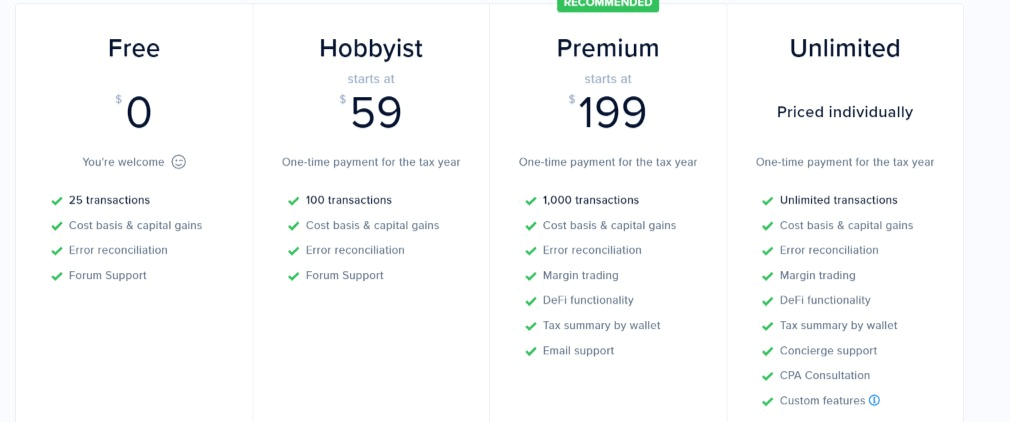
CoinTracker has a FREE version that supports up to 25 transactions in a year.
This includes capital gains tax and cost basis. Cost basis means the value of an asset when you purchased it and how much it was when you sold it.
You might be wondering what is a taxable transaction.
- Buying Crypto
- Selling Crypto
- Trade Crypto
- Transfer Crypto
- Withdrawal Crypto
- Deposit
- Staking
- Liquidity Mining
Yeah, you’re probably going to be using the higher-priced plan!
For 1,000 transactions, the price is $199 for the year. The problem is that anything over 1,000 transactions, and the pricing is not known. It’s a case-by-case situation.
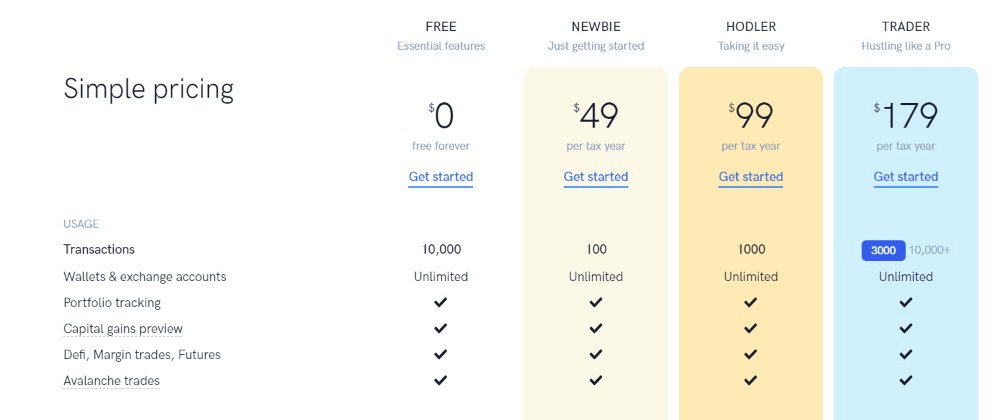
Koinly also has a free version, and it includes 10,000 transactions. The problem with the free version is that you can’t import it into TurboTax or TaxAct.
They also have a plan that handles 3,000 transactions, and it’s $179.
For 10,000+ transactions, it’s $279.
In conclusion, if you only have a few transactions and want to import them into TurboTax or TaxAct, then CoinTracker wins.
If you are into DEFI, Staking, and do more transactions, then Coinly will probably be less expensive.
Since more people probably have more than 30 transactions, Coinly is the winner.
Supported Exchanges 2026: Why Koinly’s 1,000+ Integrations Outpace CoinTracker
Maybe you love dumpster diving for shit coins or using unknown exchanges? Let’s see which software has you covered.
CoinTracker supports over 2,500 cryptocurrencies and more than 300 different exchanges. I didn’t know that many exchanges existed!
Coinly supports 17,000 cryptocurrencies and more than 350 exchanges.
Looks like Coinly is the winner for this round!
Best Crypto Tax Software for Liquidity Mining: How Koinly Handles DEX Pool Rewards
Liquidity can be a little confusing when it comes to taxes. Both say they can handle DEFI (decentralized finance), and liquidity mining falls in this category.
With Coinl,y a post in 2021 says they can deal with 90% of Uniswap pairs and will work towards 100%.

When I looked at Koinly, it says it supports all the major liquidity mining projects.
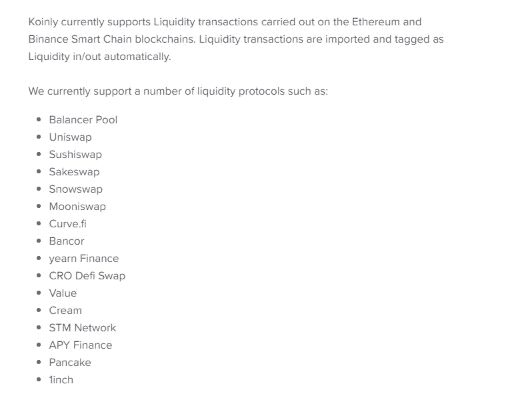
When I looked at reviews of both products, Koinly was the superior one.
The review from Forever Blogger, says Cointracker doesn’t work. When it comes to liquidity mining, it’s best to use Koinly, and that is what he uses.
I’m going to say Koinly is the winner here.
Best Crypto Tax Software for Beginners: Comparing CoinTracker’s UI vs. Koinly’s Dashboard
How I determined ease of use is by watching demos of 2 people using both software. Then I made a decision on what I thought was easier to use and why.
Here is the demo on using Koinly.
The demo on using CoinTracker was removed from YouTube.
After looking at both products, I prefer CoinTracker.
It has a nice user interface and breaks things down so that you can see all the money you’re earning from all your wallets.
It also breaks down long-term capital gains tax and short-term capital gains tax.
This round, I’m going to give it to Cointracker.
Conclusion: Koinly tax loss harvesting vs CoinTracker 2026 features
Both of these products can work in many countries and can use different currencies. The funny thing is that tax laws are similar in MANY countries.
You could say taxes are an incentive to do what the government wants.
You may have thought about NOT reporting crypto income, but the problem is the IRS (In the U.S.) can come after you FOREVER.
By filing something EVEN if it’s wrong, the IRS only has 3 years to audit you. If your income is wrong by 25%, then the IRS can come after you for 6 years.
Filing something is better than nothing.
The best thing to do is to file, but try to save yourself as much money as possible. The way to save money is to keep a cryptocurrency for over 12 months before you sell it.
After 12 months, you pay long-term capital gains tax, and this is less money than if you had sold it within 12 months.
Another way to save money is by choosing LIFO instead of FIFO with your tax forms.
LIFO stands for Last In, Last Out, and this means you sell the last coins you purchased.
Since they are the last coins, the amount of money you made is probably less than the first ones, right? The less money you earned the less you pay in taxes.
Also, there is another software called cointracker.info that I looked at, but you pay PER month to use the software.
To keep things simple, I just wanted to compare cointracking.io vs koinly.io.
Lastly, I’m currently using CakeDefi for liquidity mining and staking. Both are in the process of implementing them for 2021 taxes.
If you use CakeDefi to earn money, you can check this link here on how to import the data into cointracking.io.
I’m planning on using Koinly for taxes, but if they don’t work with CakeDefi, I’ll probably go with Cointracker.
You can learn more about Koinly by clicking on the link HERE.
In the end, crypto is very risky, and it’s going to continue to be a bumpy ride.
It’s not a bad idea to diversify.
With affiliate marketing, you can do it anywhere, anytime, around your schedule, in nearly any niche, and you can have a TON of fun doing it.
I’ve been doing it for 15 years, and I’m sharing a lot of secrets with you for FREE HERE.
I hope this blog post might have helped you a little bit when choosing which crypto tax software to use. Bye for now.